
Updated
:06 Aug 2026
How to Activate an eSIM on Your Oppo Device?
You can activate Oppo eSIM in your device via QR code scan. Open Settings> SIM Card and Mobile/Cellular Data > Add eSIM. Now scan the QR code from your device camera, and after a few minutes eSIM will set up in your device.
Embedded SIM is the latest mobile technology innovation that ensures to provide the flexible and convenient connection. Like many other devices, Oppo devices have the integrated SIM cards. But generally people are concerned with how to active the Oppo eSIM.
eSIM setup doesn’t require technical skills. The steps are quite simple. In the article, I will comprehensively discuss how to activate the eSIM in Oppo phones. Moreover, I will assist you in confirming whether your Oppo device supports eSIM or not.
Essential Steps to Take Before Activating Oppo eSIM
Before buying an eSIM, there are some essential things you need to consider.
Check Device Carrier Lock
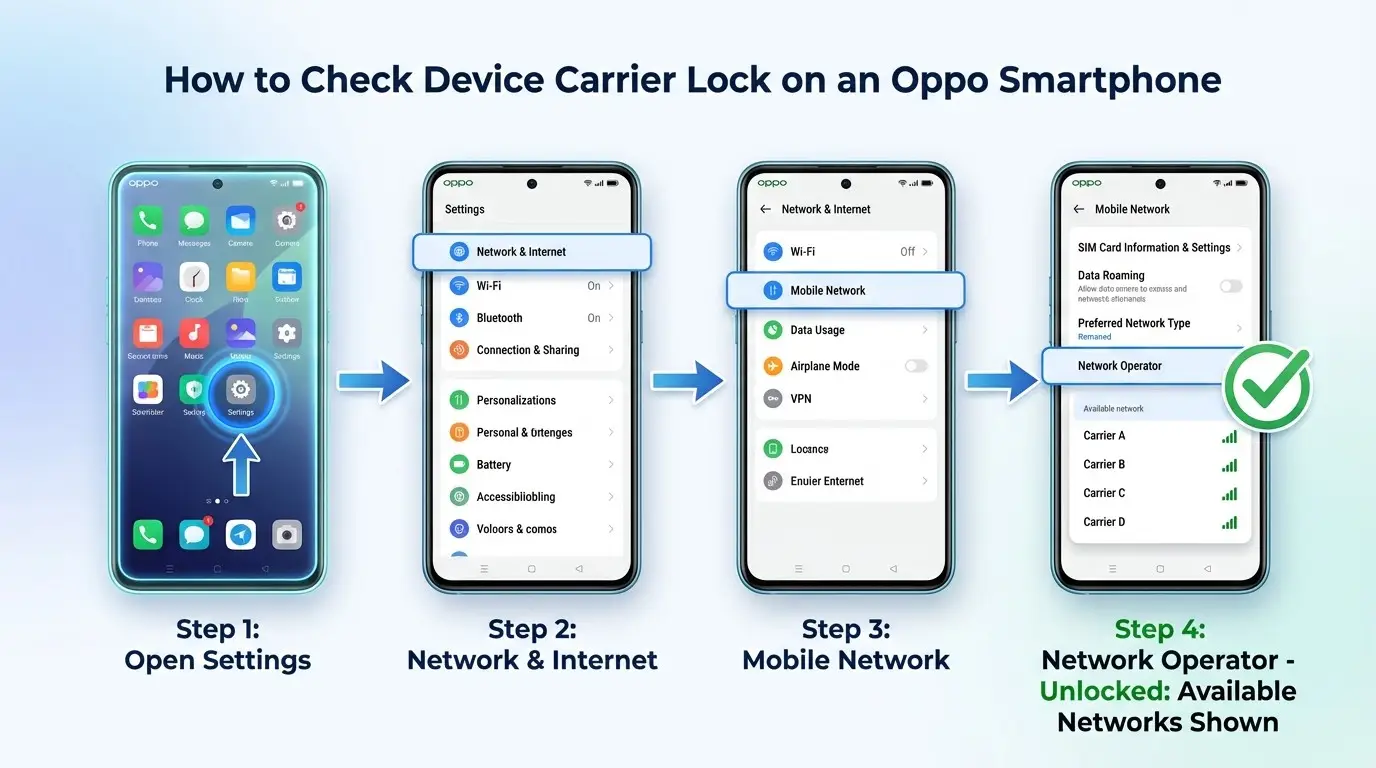
Make sure your Oppo phone carrier is unlocked. The locked device carrier means it is restricted to use only the carrier network. If you try to activate eSIM on a locked phone, your device will not accept it.
Here are the steps to confirm your device's eSIM carrier lock.
- Open the Settings app on your Oppo mobile.
- Move to Network & Internet and Mobile Network.
- Click on the Network Operator.
- In this section, if you see the list of available networks, it means your device is unlocked.
In case of the locked device, you can contact your provider and ask for assistance.
Device eSIM Compatibility
Not all Oppo phones support eSIM technology. Only the latest models have the embedded SIM feature. Hence, it's necessary to verify your Oppo phone eSIM support.
You can visit our list of eSIM-compatible devices or go through the settings to confirm it.
- Open the settings app.
- Click on the SIM Card or Connection according to your Oppo phone model.
- Here, find the Add eSIM or Mobile plan.
- If it's available on your device, it means it supports an eSIM card.
Oppo eSIM Compatible Models
Following is the list of Oppo mobile phone models that are compatible with eSIM technology.
- Oppo Find X3
- Oppo Find X3 Pro
- Find N2 Flip
- Oppo Reno 5A
- Oppo Reno 6 Pro 5G
- Oppo Reno 9A
- Oppo Find X5
- Oppo Find X5 Pro
- Oppo A55S 5G
- Oppo Find N3
- Oppo Find N3 Flip
- Oppo Find X8
- Oppo Find X8 Pro
- Oppo Reno14
- Oppo Reno14 Pro
Get the Best eSIM Card for Seamless Connectivity
There are multiple international eSIM providers worldwide. But to get the best services, you need to do comprehensive research. Yaalo is one of the top global carriers, offering eSIM plans for 200+ destinations. The eSIMs include data-only and data, voice, and texts plan.
eSIM plans further include limited and unlimited data according to users' needs. You can buy your destination eSIM and set it up in your Oppo phone via QR code scan. The provider will send you the QR code and other activation details to activate eSIM in your Android.
Here is what you can get with each Yaalo eSIM.
- Offers fast network coverage at your destination.
- Remote eSIM activation via QR code.
- Zero data roaming with no hidden charges.
- 24/7 active customer support services.
- Allow data tethering with other devices.
- Cost-effective eSIM plans with instant connectivity.
How to Activate an eSIM on Your Oppo Device?
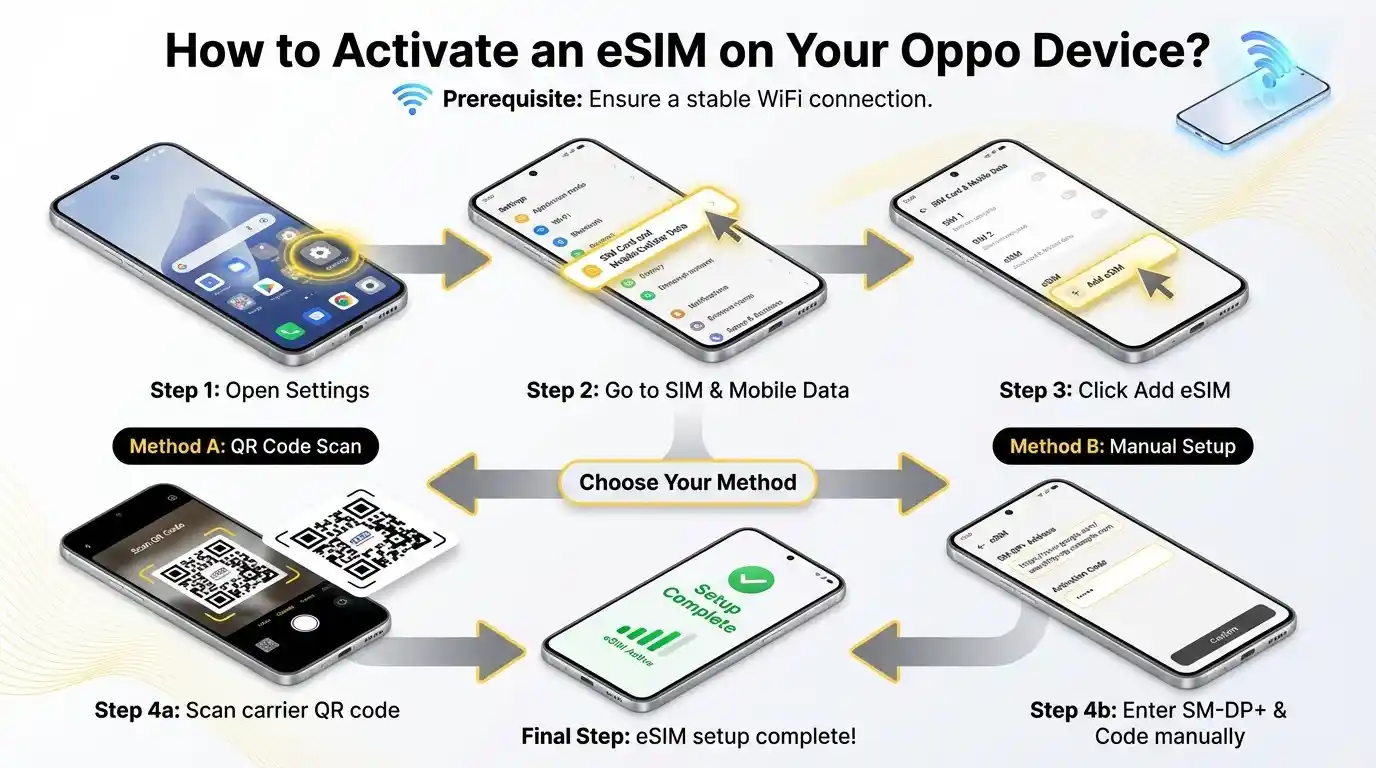
You can install and activate eSIM manually or through the QR code scan. During eSIM activation, ensure that to connect your device to a stable WiFi connection.
- Open the Settings app on your device.
- Move to the SIM Card and Mobile/Cellular Data.
- Locate the eSIM and enable it.
- Now click to Add eSIM, choose the QR code or the manual setup method.
- Open your device's camera and scan the QR code.
- In the manual method, enter the SM-DP+ address and activation code in settings.
- Follow the additional steps after a few minutes, and Oppo eSIM will be set up in your phone.
How to Manage eSIM on Oppo Devices?
You can manage the eSIMs in your device and switch between them in dual SIM functionality. In case the eSIM has expired, you can delete the plan from your Oppo phone.
Switching Between eSIM Profiles
- Open the Settings app.
- Move to SIM card & Mobile Data.
- In the SIM section, you can find the installed eSIM profiles.
- Now select the eSIM you wish to choose for data.
Removing eSIM Profile
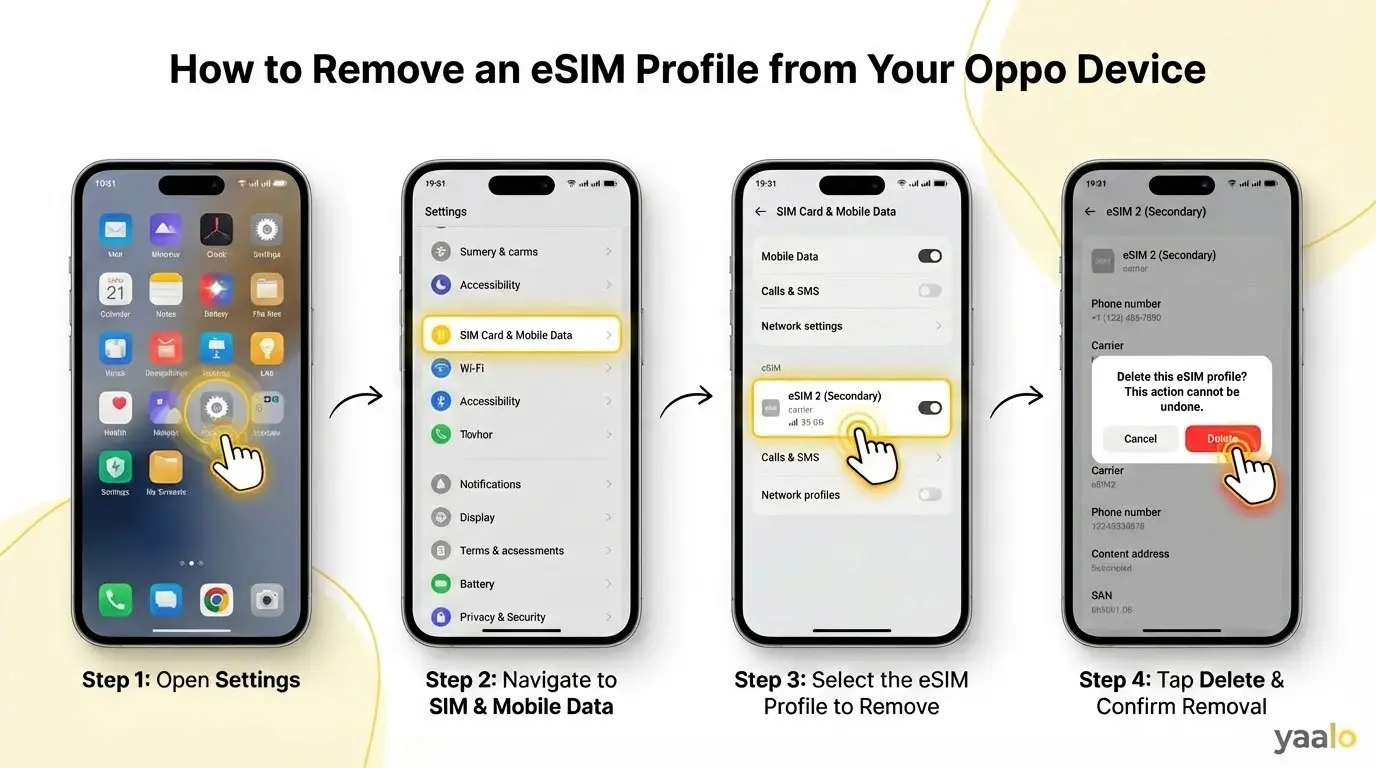
If you no longer need the eSIM profile, here are the steps to follow.
- Open the Settings app.
- Move to SIM card & Mobile Data.
- Select the eSIM profile to remove or delete.
- Click to delete eSIM and confirm the removal.
Conclusion
It's pretty simple to activate a digital SIM on Oppo devices. Before eSIM setup, you should confirm your device's eSIM support and the carrier unlock. Then choose a reliable eSIM carrier like Yaalo to get a flexible connection 24/7.
Now activate the eSIM in your device following the steps mentioned in the article. I have also dicussed the steps to switch the profile and delete it from your device.
FAQs
Can I use both a physical SIM and an eSIM on my Oppo phone?
Yes, you can use the physical SIM and eSIM in the Oppo models with dual SIM functionality. It lets you use the two active lines in a single device.
Do I need the internet to activate an eSIM on Oppo?
Yes, a stable WiFi or cellular data connection is required to set up an eSIM profile on an Oppo device.
Why is my eSIM not activating on Oppo?
If your eSIM is not activated, it might be due to outdated software or a network settings issue. Check the activation steps; if there is an issue, reconsider the steps.
Related Blogs

Nina Alexandra ●
02 Sept 2026
How to Block Spam Calls on an Android Phone: Complete Guide for 2026
Android